
AI keyboards for iPhone: how to choose
An AI keyboard for iPhone is a third-party keyboard that can fix, rewrite or translate what you type in any app. Here is what to check before you install one, and how CorrectMe, Gboard, Microsoft SwiftKey and Grammarly Keyboard compare.
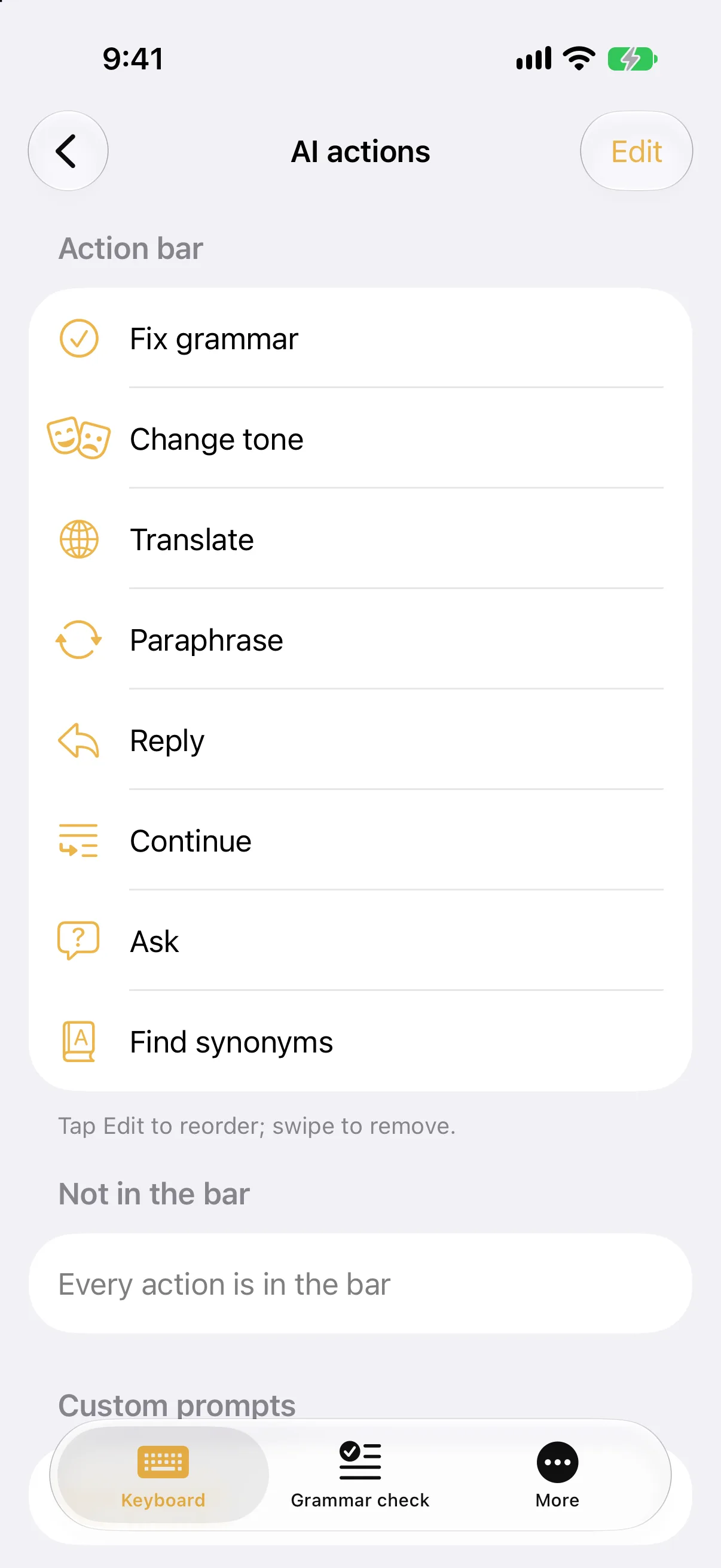
An AI keyboard for iPhone replaces the keys you type with and adds AI writing help, such as Fix grammar, Change tone and Translate, in every app. CorrectMe, an AI keyboard app for iPhone by Teleprompter LLC, is one of them: it has eight built-in AI actions, autocorrect in 9 languages and 20 free AI actions a day. Which keyboard suits you depends on your languages, how you type, how much you trust the developer with Full Access, and what you want to pay.
What does an AI keyboard do?
A normal keyboard corrects one word at a time. An AI keyboard can also work on whole sentences: correct the grammar of a message, rewrite it in another tone, translate it, or draft a reply, and put the result back into the text field. Because it is the keyboard, this works in Messages, Mail, WhatsApp, Slack and any other app that allows third-party keyboards, without copying text into a separate app.
On iPhone, every keyboard that is not Apple’s is a third-party keyboard. You install its app, add it in Settings > General > Keyboard > Keyboards, and switch to it with the globe key.
What to look for
Languages. Check two lists: the languages you can type in with autocorrect, and the languages the AI can work in. They are often different. CorrectMe has 9 typing languages (English, Hungarian, German, French, Spanish, Italian, Portuguese, Dutch and Polish) and translates into 25 languages and variants.
Typing in more than one language. With a keyboard per language, you switch every time you change conversation, or autocorrect rewrites your words into the wrong language. CorrectMe checks every enabled language at once, so there is no switching.
Where the AI runs. Some requests can run on your iPhone; others go to a server. CorrectMe tries Apple’s on-device model first on iOS 26 or later when it can do the job, and uses its cloud service otherwise.
Full Access and privacy. A keyboard can only reach the internet with Allow Full Access turned on, and with it on, the developer could send what you type. Find out what is sent and when. CorrectMe sends text only when you tap an AI action that the phone cannot run itself, and audio only while you dictate. Read what Allow Full Access means before you decide.
Price and limits. Look at what the free version allows each day and what the subscription costs per year. CorrectMe is free with 20 AI actions a day; Pro is $59.99 a year with a 7-day free trial, or $9.99 a month.
Dictation, swipe typing and extras. If you talk more than you type, check for dictation. If you slide your finger across the keys, check for swipe typing: CorrectMe does not offer it.
Four iPhone keyboards side by side
| CorrectMe | Gboard | Microsoft SwiftKey | Grammarly Keyboard | |
|---|---|---|---|---|
| Price | Free; Pro $59.99 a year or $9.99 a month | Free, no in-app purchases listed | Free; listed in-app purchases are free themes | Free; plans listed from $17.99 a month to $139.99 a year |
| Typing languages | 9, each with its own autocorrect | Its listing names 58 | Not listed in its description | Its listing says 6 |
| AI writing help | 8 built-in actions and custom prompts; 20 a day free | Its listing does not mention it | Its listing mentions AI, no specific actions | Spelling, grammar and conciseness suggestions in 20+ languages; some Premium only |
| Dictation | In Pro | Voice input sent to Google for transcription | Its listing does not mention it | Voice dictation with automatic cleanup |
| Swipe typing | Not offered | Glide Typing | Yes | Listed |
| GIFs | No | Yes, and stickers | Yes | Not covered here |
| Themes | 8 built-in, a theme editor and photo backgrounds | Its listing does not mention themes | Dozens | Its listing does not mention themes |
| Works on | iPhone, iOS 17 or later | iPhone and iPad, iOS 12.0 or later | iPhone and iPad, iOS 15.0 or later | iPhone and iPad, iOS 17.4 or later |
Facts about Gboard, SwiftKey and Grammarly come from each product’s own App Store listing, checked on November 26, 2026, as on our comparisons with Gboard, SwiftKey and Grammarly Keyboard. Gboard’s listing showed version 2.3.19, from May 2022, as its latest release. Listings change, so check them before you decide.
Which one suits you?
- Gboard suits you if you want a free keyboard with no subscription, search Google while chatting, send GIFs and stickers, type in a language CorrectMe lacks such as Arabic, Japanese or Russian, or like Glide Typing.
- Microsoft SwiftKey suits you if you want a free keyboard that learns your style, swipe typing, lots of ready-made themes, or you use an iPad or an iPhone that cannot run iOS 17.
- Grammarly Keyboard suits you if you want writing suggestions in many languages, swipe typing, Premium across all your devices, or its document editor with plagiarism and AI detection.
- CorrectMe suits you if you want one-tap AI actions on what you typed (fix grammar, change tone, translate, reply), write in two or more of its 9 languages without switching keyboards, want to design your own theme, or want a lower yearly price than Grammarly’s yearly plans.
Limits of CorrectMe to know
CorrectMe is for iPhone only, with iOS 17 or later. It has no swipe typing, no GIFs and 9 typing languages. Cloud AI actions and dictation need Full Access and a connection, and dictation is part of Pro. Like every third-party keyboard, it is replaced by Apple’s keyboard in password fields and on phone number pads.
You can keep more than one keyboard: iOS lets you add several and switch with the globe key, so you can try CorrectMe next to the one you use now.
Try an AI keyboard on your iPhone
Install the keyboard app
Download it from the App Store and open it once. Its keyboard then appears in Settings.
Add the keyboard
Open Settings > General > Keyboard > Keyboards > Add New Keyboard and choose it under Third-Party Keyboards.
Decide on Full Access
Tap the keyboard's name in the list. Turn on Allow Full Access only if you want features that need the internet, such as cloud AI or dictation.
Switch to it and type
In any app, touch and hold the globe key and pick the new keyboard. Your other keyboards stay in the list, so you can switch back at any time.
Questions
- What is an AI keyboard?
- A keyboard app that adds AI writing help to the keys, such as fixing grammar, changing the tone of a message or translating it, in every app where you type. On iPhone it is a third-party keyboard you add in Settings.
- Do AI keyboards on iPhone need Full Access?
- Any feature that runs on a server needs it, because iOS blocks the network for keyboards without Full Access. CorrectMe can run some AI actions with Apple's on-device model on iOS 26 or later; cloud actions and dictation need Full Access.
- Is there a free AI keyboard for iPhone?
- Several are free to download. CorrectMe gives 20 AI actions a day free. Gboard and SwiftKey are free; their listings do not describe AI writing actions like Fix grammar. Grammarly is free with some features marked Premium only.
- Which AI keyboard is good for writing in two languages?
- If your languages are among English, Hungarian, German, French, Spanish, Italian, Portuguese, Dutch and Polish, CorrectMe checks every one you enable at once. For other languages, Gboard's listing names 58 typing languages.
- Can an AI keyboard read my passwords?
- No. iOS always uses Apple's keyboard in password and other secure fields, for every third-party keyboard, with or without Full Access.
- Is CorrectMe available on Android?
- No. CorrectMe is an AI keyboard app for iPhone only, with iOS 17 or later. This page compares the iPhone App Store listings of all four keyboards.