
Dictation that types as you talk
Tap the microphone on the CorrectMe keyboard and speak. Your words show up in the text field while you are still talking, in the language you speak.
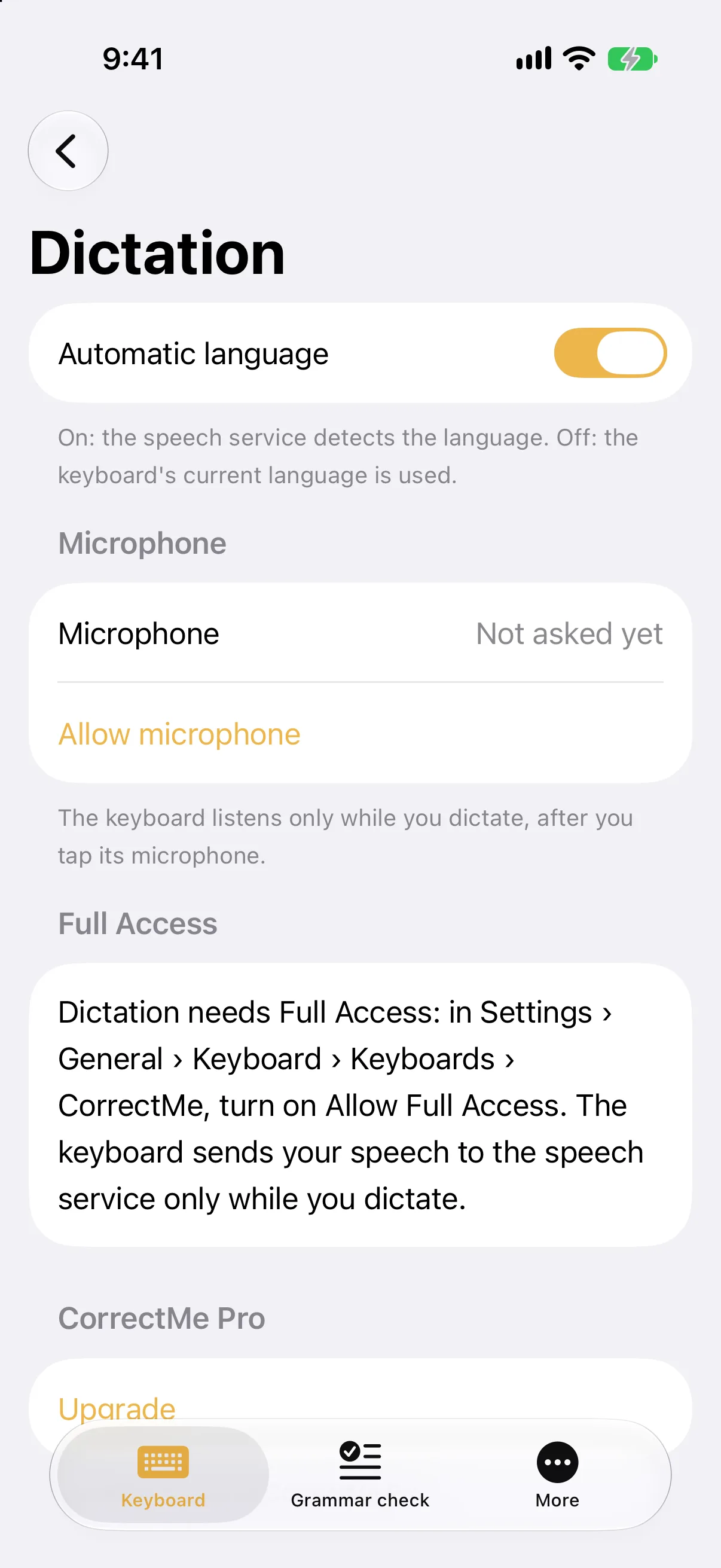
CorrectMe, an AI keyboard app for iPhone by Teleprompter LLC, has its own dictation: tap the microphone on the keyboard and your words appear as you speak. Dictation is part of CorrectMe Pro ($59.99 a year with a 7-day free trial, or $9.99 a month) and needs Full Access, because a speech service turns your audio into text.
How it works
Tap the microphone at the right end of the suggestion bar. While you talk, a recording strip replaces the suggestions: a level meter that moves with your voice, a label with the language being heard, and a stop button. The text appears in the field as you speak.
CorrectMe handles the spacing and capitals for you. A new sentence starts with a capital where the field asks for one, a space goes in before your words when the text before needs it, and punctuation attaches to the word in front of it. The speech service’s own capitals are kept.
Why is it more accurate than the iPhone’s own dictation?
Three things differ.
- The size of the speech model. The iPhone’s dictation is built to run on the phone itself, so its model has to be small enough to fit there. CorrectMe streams your voice to a much larger speech model on a server, which has far more room to tell similar-sounding words, names and accents apart.
- The language. With the iPhone’s dictation you choose the language before you talk. CorrectMe detects the language while you speak, and it tells the speech service which keyboard languages you have enabled, so English followed by Spanish needs no switch.
- Second thoughts. Words appear at once, then settle when you pause: the model corrects its first guess once it has heard the rest of the phrase.
The cost of this is that CorrectMe’s dictation needs an internet connection and Full Access, and the iPhone’s does not.
Languages
With Automatic language on (in the app’s Dictation screen) the speech service detects the language you speak, so you can switch between, say, Hungarian and English without changing anything. CorrectMe also tells the service which keyboard languages you have enabled, with the one on screen first.
To fix one language for a session, tap the language label in the recording strip and pick it from the list. The list shows Automatic and each of your enabled keyboard languages.
What do you need for dictation?
- CorrectMe Pro. Dictation is a Pro feature. If you tap the mic without Pro, the keyboard shows what Pro includes and an Upgrade button that opens the app.
- Full Access. Turn on Allow Full Access for CorrectMe in iOS Settings. Without it, the keyboard tells you how to turn it on instead of recording.
- Microphone permission. Allow the microphone once in the CorrectMe app. If it is off, the keyboard offers to open the app for you.
- A connection. Speech is turned into text by a speech service, not on your iPhone.
What does dictation send, and when?
The keyboard sends your audio to the speech service only while you are dictating, and stops when you tap stop. Dictation never starts in password, username or one-time code fields.
When something goes wrong
If nothing was heard, the keyboard says so and lets you try again. If another app or a call takes the microphone, recording stops and you can retry. If the connection drops, the keyboard asks you to check it and try again.
Start dictating
Turn on Full Access
In iOS Settings › General › Keyboard › Keyboards › CorrectMe, turn on Allow Full Access. Dictation sends audio to the speech service, which needs it.
Allow the microphone
Open the CorrectMe app, go to Dictation and allow microphone access. A keyboard cannot ask for it on its own.
Tap the mic
The microphone is at the right end of the suggestion bar. A recording strip with a level meter takes the bar's place.
Speak, then tap stop
Words appear as you talk. Tap the stop button at the end of the strip when you are done.
Questions
- Is dictation free?
- No. Dictation is part of CorrectMe Pro, which costs $59.99 a year with a 7-day free trial, or $9.99 a month. Typing, autocorrect and themes stay free.
- Why does dictation need Full Access?
- iOS only lets a keyboard use the network with Full Access, and your speech is turned into text by a speech service. The keyboard sends audio only while you are dictating.
- Can I dictate in a password field?
- No. The microphone is not offered in password, username or one-time code fields.
- How do I pick the language?
- Tap the language label in the recording strip and choose Automatic or one of your keyboard languages. Automatic lets the speech service detect what you speak.
- How is this different from the iPhone's own dictation?
- The iPhone's dictation is built to run on the phone, so its speech model has to be small, and you choose the language before you talk. CorrectMe streams your voice to a much larger speech model on a server and detects the language as you speak, which is why it gets names, accents and mixed languages right more often. It needs Pro and a connection.
- Does CorrectMe dictation work without an internet connection?
- No. A speech service turns your audio into text, so dictation needs a connection as well as Full Access.